
Bluescreens v2
- Thread starter ModSe7en
- Start date
You are using an out of date browser. It may not display this or other websites correctly.
You should upgrade or use an alternative browser.
You should upgrade or use an alternative browser.


Hell no.Did you do it while the system was still on?
I may be dumb, but I'm not that dumb.

Hell no.
I may be dumb, but I'm not that dumb.

Are you positive you seated the stick correctly? You wouldn't believe how often people don't properly seat it, probably because they're worried about breaking it.
I'm gonna put it in the other (paired) slot and see if that makes a difference.I think you found a bad stick. If it's constantly beeping, that usually means a RAM problem. The beeping is good. It means your motherboard is working.
I FUCKING HATE HARDWARE WORK ASFGHIDFKAL
Seriously, I'm going into a sweat thinking I'm gonna fuck it up horribly.
Not at all. I have never done this type of thing before (the graphics card doesn't count, PCIe =/= RAM slots)
Are you positive you seated the stick correctly? You wouldn't believe how often people don't properly seat it, probably because they're worried about breaking it.
Just line it up, the press in until you hear a click.Not at all. I have never done this type of thing before (the graphics card doesn't count, PCIe =/= RAM slots)
If you have a motherboard like the one below, the clips on the bottom are open, the clips on the top are closed. You want them closed.
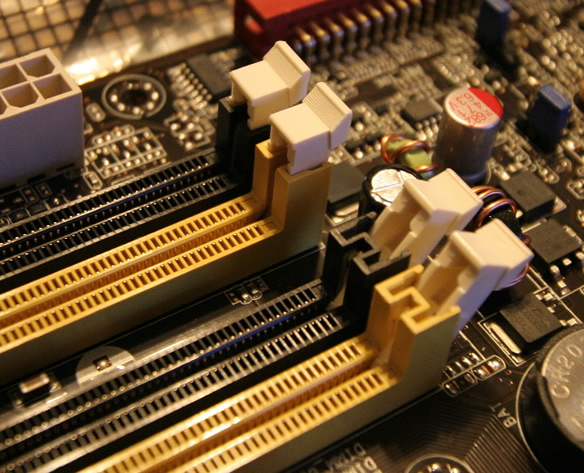

I'm about to gift him $80 for new 8GB memory stick, to be honest... All this BSOD stuff looks like Mexican soap opera already.
I'm not even sure it's the RAM. Well, okay, most of them are 0x1e's, but still not sure if the copy of Windows or the drivers or something else are to blame.I'm about to gift him $80 for new 8GB memory stick, to be honest... All this BSOD stuff looks like Mexican soap opera already.
List of root causes of your problem would be the following (in descending order possibility wise):I'm not even sure it's the RAM. Well, okay, most of them are 0x1e's, but still not sure if the copy of Windows or the drivers or something else are to blame.
- RAM;
- Motherboard;
- CPU.
Edit: OS has nothing to do with that. BSOD's are primarily indicating hardware issues (thus inability of OS to communicate to hardware - that's when drivers faults come into place as well), so just forget about your "OS version" and stop blaming Windows 7. It's pretty stable and solid OS.
PS. Keep in mind that if you replace your motherboard your OEM license will become ineffective.
Ok, finally seated stick #2 properly, but my graphics are sorta blue user error, booted up fine, got into windows, then something sounded like it bashed against something or popped off something else, but no errors to be had yet. I think it was the hard drive.

That can't possibly be good. You may want to check your computer again to see if anything is out of place.Ok, finally seated stick #2 properly,but my graphics are sorta blueuser error, booted up fine, got into windows, then something sounded like it bashed against something or popped off something else, but no errors to be had yet. I think it was the hard drive.
If it was your hard drive you would've had a lot of errors in your Event Log in a first place, and then, when your HDD finally crashed you wouldn't be even able to proceed to Windows logo which indicates the boot up process' start.Ok, finally seated stick #2 properly,but my graphics are sorta blueuser error, booted up fine, got into windows, then something sounded like it bashed against something or popped off something else, but no errors to be had yet. I think it was the hard drive.
The way I would describe it is 'hard reset'. It happens once-twice on startup and everything has stayed fine (for a while only, as you can tell).That can't possibly be good. You may want to check your computer again to see if anything is out of place.
Maybe it was the HDD arms going into the holders/whatever you call it?
Nowadays most HDDs have S.M.A.R.T. monitoring systems that predicts possible HDD failures and generates alarms in Event Log like this (this one is from my Event Log when my 2TB Seagate was about to crash):

www.google.com - the best resource ever.I'm thinking of doing a test, but I need some info.
When memory is at full capacity, does it automagically start relying on swap or does it crash and burn? I'm itching to try L4D2 with this setup.