Status
Not open for further replies.

Hiiglane

Notably Dangerous Demo-Knight
Name Luigi123

Summary Luigi123 - Admin Abuse / False Ban Reason

SteamID
[U:1:102587414]
https://steamcommunity.com/profiles/[U:1:102587414]
https://stats.skial.com/#summary/player/SteamID/All/[U:1:102587414]
https://www.skial.com/sourcebans/index.php?p=banlist&advType=steamid&advSearch=[U:1:102587414]
https://www.skial.com/sourcebans/index.php?p=commslist&advType=steamid&advSearch=[U:1:102587414]

When did this happen? Just Now

Which server did this happen on? DEATH RUN | US

Any other information

evi1.png

evi2.png

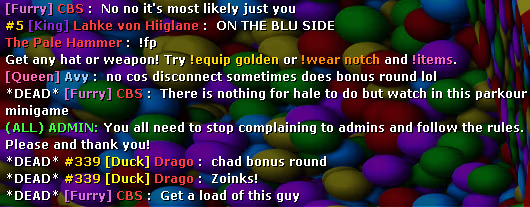
Admin once again threatened a hale to "stop afking" on dr_bazinga's parkour minigame in which Hale cant do anything but watch reds progress below.

This is a common behavior and ill throw in a documented example of him doing the same thing on dr_boomershooter about a week ago. (Threatening to slay a hale for standing still on auto mode which removes all buttons and forces Hale to watch players complete the map)

https://www.skial.com/attachments/thanksluigi123-png.775/
 
Last edited:
https://www.skial.com/threads/collecting-evidence-in-tf2.47782/
Recording (demo)
Team Fortress 2


Recording

  1. Open the console, type record demoname and hit 'Enter': you can name the file whatever you prefer by replacing 'demoname'. It is common to name it after the offense or the offender.
    Code:
    ] record demoname
    Recording to demoname.dem...
  2. Type status in the console. This will give us a list of players in the server with their Account ID.
  3. Close the console, what you see on your screen is being recorded: e.g. if you open the scoreboard, the demo will record it. Same for opening the menu, switching spectated players, ..
  4. Stop recording by entering stop in the console.
    Code:
    ] stop
    Completed demo, recording time x.x, game frames x.
Retrieval and upload
  1. To locate the demo, go to your Steam folder: default location is C:\Program Files\Steam\SteamApps\common\Team Fortress 2\tf on Windows.
  2. Find the file, it is saved as demoname.dem: with 'demoname' the name you chose earlier.
  3. Upload the file to a file hosting website (e.g. MediaFire).
Replay the demo yourself
  1. Open the console, type playdemo demoname and hit 'Enter': with 'demoname' the name you gave to your recording.
  2. There are 2 tools for replaying demos, you can open them by entering demoui or demoui2 in the console: these tools let you pause, rewind, review ticks, ...
  3. Enter stopdemo in the console to stop the replay of the demo.
Additional information about recording demos can be found here.
 
  • Like
Reactions: Sir Trooper
https://www.skial.com/threads/collecting-evidence-in-tf2.47782/
Recording (demo)
Team Fortress 2


Recording

  1. Open the console, type record demoname and hit 'Enter': you can name the file whatever you prefer by replacing 'demoname'. It is common to name it after the offense or the offender.
    Code:
    ] record demoname
    Recording to demoname.dem...
  2. Type status in the console. This will give us a list of players in the server with their Account ID.
  3. Close the console, what you see on your screen is being recorded: e.g. if you open the scoreboard, the demo will record it. Same for opening the menu, switching spectated players, ..
  4. Stop recording by entering stop in the console.
    Code:
    ] stop
    Completed demo, recording time x.x, game frames x.
Retrieval and upload
  1. To locate the demo, go to your Steam folder: default location is C:\Program Files\Steam\SteamApps\common\Team Fortress 2\tf on Windows.
  2. Find the file, it is saved as demoname.dem: with 'demoname' the name you chose earlier.
  3. Upload the file to a file hosting website (e.g. MediaFire).
Replay the demo yourself
  1. Open the console, type playdemo demoname and hit 'Enter': with 'demoname' the name you gave to your recording.
  2. There are 2 tools for replaying demos, you can open them by entering demoui or demoui2 in the console: these tools let you pause, rewind, review ticks, ...
  3. Enter stopdemo in the console to stop the replay of the demo.
Additional information about recording demos can be found here.
Of course, when its me it needs "evidence" but when its anybody else, awful screenshots are evidence

But hey "erm, everyone makes mistakes!"

https://www.skial.com/threads/yara-caribbean-pirate-map-exploit.99713/
 
  • Like
Reactions: Pup de la Babe
I am completely disagree with you. You NEED to understand that I am new to admin on Skial. Every single thing is not listed because the rules are so long that most people don't read it all and we cannot think of every possible problem. It doesn't mean that you're seeing me on that server earlier ago doing something wrong and immediately reported on via forum just to demoted me? We are all humans and takes time to learn some new things as every servers are different.
 
Status
Not open for further replies.